GitHub Profile Picture Setup: Avatar Size Specs, Pixel Art Avatars, and Identicon Alternatives
Open the free square face generator and follow along.
Identicon vs a tuned pixel face
| Auto identicon | Tuned pixel face | |
|---|---|---|
| Origin | Random hash of your email | Your choices, trait by trait |
| Recognizability | Reads as one of millions | Reads as yours |
| Consistency | Changes if the email changes | Stable across accounts and re-uploads |
| Personality | Symmetric abstract pattern | Hair, eyes, hat and palette you picked |

GitHub Avatar Size Specs: 460x460, 1 MB, and 1:1
GitHub accepts square profile pictures up to 1 MB, but upload at 460x460 px or 512x512 px for a crisp profile. Keep the face centered inside a 400x400 safe zone with 10% padding, because GitHub scales avatars down to 16–48 px in commit lists, issue comments, and navigation. Export as PNG for pixel art, JPG for photos, or GIF only if animation matters. Step 1: crop to 1:1. Step 2: resize to 460x460. Step 3: check at 32 px. A 460x460 PNG with a plain background stays readable at 16 px. Avoid text smaller than 24 px in the 460x460 file; it disappears when GitHub renders your avatar at 20 px.
Pixel Art Avatars for Developer Profiles: 16x16 to 64x64
Pixel art avatars work because GitHub displays tiny versions, so a 32x32 grid can read like a crisp sprite. Start at 16x16 for maximum clarity at 16 px, or 32x32 for more expression at 32–48 px. Use an 8–16 color palette, 1 px dark outline, and no anti-aliasing. Scale by integer multiples: 16x16 ×32 = 512x512; 32x32 ×16 = 512x512; 64x64 ×8 = 512x512. Save as PNG, then upload to GitHub. The square face generator’s classic Flash and modern pixel-art styles can output these sizes automatically. Example: a 32x32 avatar with 12 colors, black 1 px outline, and a 4 px eye gap stays recognizable when scaled to 460x460 and downscaled to 32 px. Avoid gradients and 1 px highlights unless you test at 16 px.
Identicon Alternatives for Developer Profiles
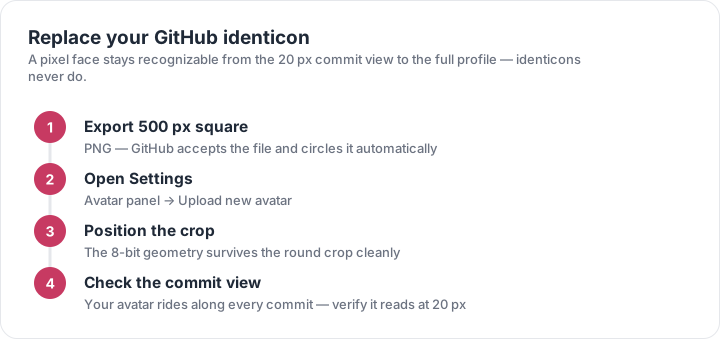
GitHub Identicons are deterministic 5x5 mirrored pixel grids generated from your user ID, usually in two colors. They are unique, but generic: no face, no expression, and little personal brand. Better alternatives: a 32x32 pixel-art face, a 64x64 8-bit portrait, a geometric monogram, or a retro anime avatar. For developer profiles, choose a 512x512 PNG under 1 MB, keep the head centered, and use 8–16 colors. If you want an Identicon-inspired look, use a 5x5 grid, mirror it, and add a 1 px border. Example: replace a 5x5, 2-color Identicon with a 32x32, 12-color face. Upload via GitHub Settings > Public profile > Profile picture > Edit. Test at 16 px, 32 px, and 48 px before saving.
Step-by-Step GitHub Profile Picture Upload
Go to github.com/settings/profile, click Edit under Profile picture, then Upload a photo. Choose a PNG, JPG, or GIF up to 1 MB. Crop to 1:1, keep eyes near the upper third, and center the face. Use 460x460 px or 512x512 px. For pixel art, export from the square face generator at 512x512 with nearest-neighbor scaling. Click Set new profile picture, then Save. GitHub may cache the old avatar; hard-refresh with Ctrl+F5 or append ?s=460 to the avatar URL to verify. Check the result in a commit list at 16 px, an issue comment at 32 px, and your profile header at 460 px. If the 16 px version is muddy, increase contrast, remove fine outlines, and re-upload.
Optimizing Pixel Art for GitHub’s Small Sizes
GitHub renders avatars at 16 px in commit lists, 20–32 px in notifications and comments, and up to 460 px on your profile. Design for the smallest size first. Use a 16x16 or 32x32 canvas, 1 px outlines, and 8–12 colors. At 16 px, a 32x32 sprite loses half its detail, so simplify eyes, mouth, and hair into 2–4 px shapes. Keep contrast high: dark outline against a light or mid-tone background works in GitHub light and dark modes. Example: a 32x32 face with 3 px eyes, 2 px nose, and 4 px mouth remains readable when downscaled. Export at 512x512 PNG, under 1 MB, then test at 16 px, 32 px, 48 px, and 460 px. If it fails, remove 1 px highlights and re-export.